


I installed Whataburger because ordering from a restaurant app should do more than display a menu. I wanted to see whether it actually makes the trip from “I need food” to “my order is ready” easier, especially when I already know what I want but need to adjust it. My overall impression is positive, with an important qualification: this is most useful when Whataburger is already the restaurant you have chosen. It is not a general food-discovery tool, and it cannot make a busy location, a long drive, or an indecisive group disappear.
As a free Food & Drink app from Whataburger, it focuses on a narrow job: helping you get the chain’s food in the way you prefer. That narrow focus is also its main strength. Instead of forcing me to search through unrelated restaurants, I can move from menu browsing to customization and ordering within one brand’s system. The app is marked for Everyone, runs on devices using at least OS 10, and the current version is 6.0.22. It first appeared on October 31, 2016, so this is an established ordering app rather than a newly launched experiment.
From a food decision to a submitted order
Starting with the right expectation
The best starting condition is simple: I am already near a Whataburger, I know I want something from the menu, and I would rather prepare the order on my phone than repeat every choice at a counter. In that situation, the app gives me a more controlled path. I can take a moment to think through the order, check the available choices, and make changes before handing it over to the restaurant.
That distinction matters. I would not open this app expecting a broad restaurant comparison, grocery delivery, recipe ideas, or a map of every possible meal in town. Its purpose is much more direct. If your group is debating between several chains, a general delivery service may be more convenient. If everyone has already settled on Whataburger, however, using the restaurant’s own app makes more sense because the menu and the ordering process are built around that one destination.
The app’s store summary presents it as a rewarding way to get a Whataburger order made to your preferences. In everyday use, I read that less as a promise of a complicated loyalty platform and more as an invitation to place repeatable, customized orders. The practical value is strongest when I want to avoid starting from scratch each time or when I need to pay close attention to the details of a meal.
Choosing a location before the order becomes a problem
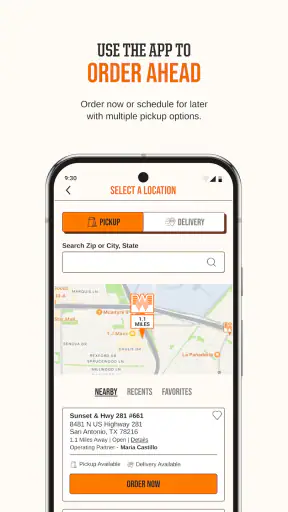
My first useful habit is to treat the restaurant location as part of the order, not as a final detail. A nearby branch may be convenient for pickup, while another location could be better for a different route. Selecting the wrong restaurant early can create unnecessary friction later, particularly if I am ordering while traveling or sending someone else to collect the food.
I would choose the location before spending much time customizing a meal. That creates a cleaner handoff between the app and the restaurant because the order is being prepared for the place I actually intend to visit. It also gives me a chance to think about the real-world journey: am I driving there now, collecting food on a lunch break, or arranging a meal for someone who will arrive later?
This is one of the less obvious ways to use a restaurant app well. The phone screen encourages me to focus on menu choices, but the outcome depends just as much on the selected location and the timing. A beautifully customized order is not helpful if it is waiting at the wrong branch.
Building a meal without rushing the details
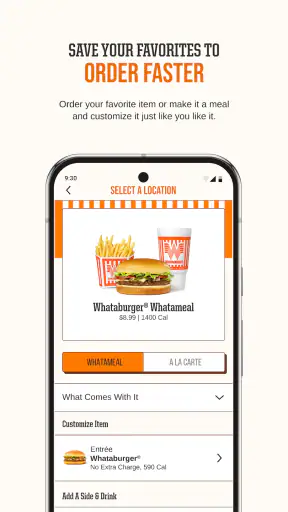
Once I have the destination in mind, I move through the menu and select the items I want. The important part is not merely adding a burger or meal to a basket. It is slowing down enough to review the available choices and make the order match what I actually intend to eat. This is where the app is more useful than a hurried verbal order: I can inspect the screen, reconsider an option, and correct a mistake before submission.
I recommend reading the order as a complete meal rather than as a collection of isolated taps. Check the main item, any included sides or drinks, and every change you made. If I am ordering for more than one person, I mentally separate each person’s meal while reviewing the basket. That reduces the common problem of remembering who wanted which adjustment after several items have been added.
Customization is particularly valuable for repeat orders. I can use the app as a planning tool, not just a checkout screen: decide what I want while away from the restaurant, make the choices carefully, and submit only when the details look right. The trade-off is that more choice also means more opportunities to overlook something. Convenience comes from control, but control requires a final review.
Using the phone as a quiet ordering space
One everyday scenario shows where the app fits best. Imagine I am leaving work with a short break, already know which Whataburger location is on my route, and do not want to spend the entire stop deciding at the counter. I can begin the order before leaving, make the choices while I am still stationary, and arrive with the order already organized. The benefit is not that the app removes every wait; it is that it moves the decision-making away from a noisy, time-pressured moment.
For a family order, the same workflow can prevent a different kind of confusion. I can ask each person what they want, enter one meal at a time, and review the combined order before sending it. That handoff from conversation to phone is useful because the app becomes a written record of the choices. Still, I would not rely on memory alone for special requests. I would check every item on screen and confirm that the changes appear where I expect them.
Where rewards fit into the experience
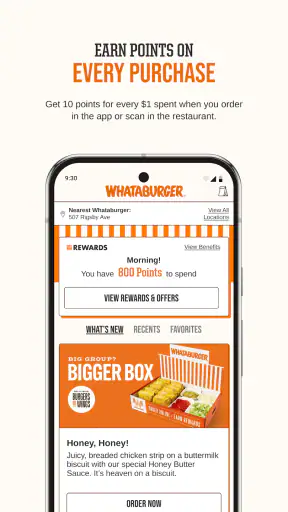
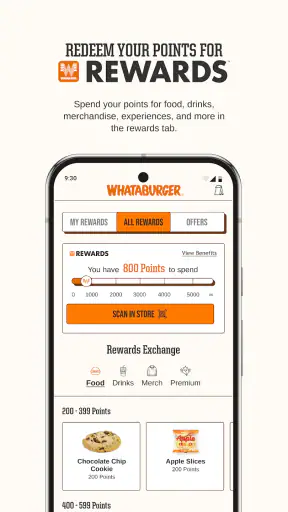
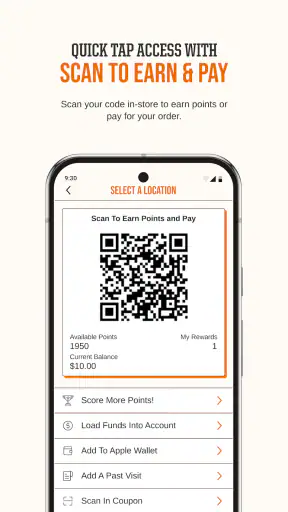
The rewarding side of the app is most relevant to people who return to Whataburger regularly. Occasional visitors may still appreciate mobile ordering, but frequent customers have more reason to pay attention to the account and order history areas available in the experience. I see this as a long-term convenience rather than an instant reason to install the app.
My advice is to think of rewards as a bonus attached to a useful ordering workflow, not as the only reason to use it. If the ordering process does not suit your routine, a reward alone may not compensate for the extra steps. On the other hand, if Whataburger is already part of your normal meal rotation, keeping orders and account activity in one place can make the app feel more worthwhile over time.
The handoff from phone to restaurant
Submitting an order is not the end of the process. It is the handoff: the app passes my selections to the restaurant, and the restaurant turns those selections into a prepared meal. I find it helpful to treat the confirmation screen as a checkpoint. I want to know which location received the order, what I selected, and where I am expected to collect it or receive it.
This is also the moment when I stop editing and start following the plan. If I am driving, I do not want to keep interacting with the phone. I would finish the order before moving, keep the relevant confirmation available, and make sure the person collecting it knows the intended location and order details. For a shared family order, that small handoff can prevent someone from arriving at the restaurant without the information needed to identify the order.
The app can organize the information, but it cannot manage every part of the physical visit. Traffic, parking, a crowded restaurant, or a delayed preparation can still affect the result. This is why I prefer to view mobile ordering as coordination rather than a guarantee of immediate food. It improves the preparation stage, while the final experience still depends on the restaurant and the journey.
Checking the result instead of assuming perfection
When I receive the order, I use the information from the app as a checklist. I compare the number of meals, the main items, and the important custom choices. This is especially worthwhile when ordering for several people or when one person has a strong preference that would be easy to miss.
That final check is not a criticism of Whataburger alone. Digital ordering makes customization clearer, but it also creates a longer chain between the person choosing the meal and the person assembling it. The more detailed the order, the more valuable a quick review becomes. If something is wrong, noticing it before leaving the location is usually easier than discovering it after everyone has unpacked the food.
The best outcome is therefore not simply a faster transaction. It is a meal that matches the order I intentionally created, collected from the location I selected, with less uncertainty than I would have had if I were trying to remember every detail at the counter. For repeat customers, that repeatable process is the app’s strongest practical result.
What the rating and reach suggest
The app has an average rating of 3.3 from around 31 thousand ratings, alongside roughly 14 thousand written reviews. I read that as a sign that the experience is useful for many people but not consistently smooth for everyone. A restaurant app can be excellent when the menu flow and location handoff work properly, yet frustrating when a user encounters a technical issue at the exact moment they are hungry or in a hurry.
Its reach is substantial, with over 5 million installs, which tells me that mobile ordering is a meaningful part of how customers interact with the brand. That popularity does not make the app perfect, but it does make it a reasonable option to test if Whataburger is already your preferred restaurant. Because it is free, the main cost of trying it is your time and attention during setup and the first order.
Where the workflow breaks down
The first weak point is dependency on the app-to-restaurant handoff. If the location, timing, or order status does not align with the real-world visit, the convenience can quickly turn into extra checking and waiting. I would be cautious about using mobile ordering for a very tight schedule, an important pickup for someone else, or any situation where a delay would cause a serious problem.
The second weak point is customization overload. The ability to shape an order is helpful, but it puts responsibility on me to understand what I selected. A person who prefers to speak directly with staff about a complicated request may feel more confident ordering at the restaurant. The app is better for choices that can be clearly represented on screen than for conversations requiring explanation or back-and-forth clarification.
The third issue is that the app has little value when Whataburger is not the obvious choice. A general delivery platform may win when I want to compare restaurants, combine different cuisines, or let a group choose from many places. The Whataburger app wins when the decision is already made and I care more about a focused ordering path than broad selection.
I would also skip it if I rarely visit the chain and do not want another account-based food app in my routine. Installing an app for a single uncertain visit may be unnecessary. In contrast, regular customers, people who repeat customized meals, and anyone who dislikes placing a detailed order verbally are the clearest audience.
My practical recommendation
I recommend giving it a try if you frequently order from Whataburger and want a written, customizable route from menu to restaurant. Begin by choosing the correct location, build the meal slowly, review the entire basket, and keep the handoff details in mind before you submit. Those steps sound basic, but they address the points where a convenient digital order can become an inconvenient physical visit.
I would not describe it as the best food app for everyone. It is a focused tool for one restaurant, and its middling 3.3 average shows that the experience may not feel equally reliable to every customer. Still, the free price makes experimentation easy, and the Everyone age rating keeps it broadly accessible. If your normal Whataburger order involves specific choices or repeated visits, the app can save mental effort and make the process easier to repeat.
My final judgment is that Whataburger works best as a preparation and coordination tool, not as a magic shortcut. It helps me decide, customize, and pass a clear order to the selected restaurant. The result is strongest when I choose the location carefully and leave enough time for the real-world pickup. For a regular customer, that is a useful improvement over starting from zero at the counter; for someone seeking restaurant variety or guaranteed speed, a different kind of food app may be the better fit.


